

 WordPress & YOOtheme Pro
 WooCommerce Development
 Website Planning
 Website Ownership & Access
 Website Support & Growth
 Website Launch Checklist
WordPress Website Launch Checklist: Check the Whole Working Site
A launch review should prove that the planned website is ready to be used. Looking at the homepage and installing an analytics tag does not establish that content is complete, inquiries arrive, or the owner controls the accounts.
Use this checklist for a new WordPress website. Record the result of each applicable check, who performed it, and any unresolved issue. Add project-specific checks for functions beyond the basic site. A store also needs the WooCommerce order tests.
The checklist supports the final stage of a complete website build. It does not certify that Google has indexed the site or that future maintenance is covered.

Set up the review before changing the live site
Confirm the release scope and environment
Keep the agreed page inventory and scope beside you. Define which domain is production, which environment is staging, and who can approve release. Record any existing DNS or mail configuration that must continue working.
Prepare the rollback route before deployment
Prepare a recoverable backup and a rollback route before deployment changes. On a brand-new site, rollback may mean returning to the previous release or restoring the last tested version. On an already active store, restoring an old database could remove newer orders, so recovery needs to account for live transactions.
Record results and distinguish launch blockers
Use these result states consistently:
| Result | Meaning | Next action |
|---|---|---|
| Pass | The expected behavior was observed | Record the evidence and date |
| Blocked | A failure prevents safe or useful release | Fix and repeat the relevant check |
| Follow-up | Release can proceed with an understood limitation | Assign an owner and a review condition |
| Not applicable | The feature is outside this project | Record why it does not apply |
Missing critical content, a broken main inquiry path, an unusable checkout, or accidental exposure of private information should not be hidden in a general “minor issues” list. An unavailable search ranking is a different type of issue from a form that cannot submit.
1. Reconcile the page inventory with the actual site
Match published pages to the agreed scope
- Every planned launch page is accounted for. Compare the agreed list with published URLs. Mark deliberately deferred pages rather than leaving unexplained gaps.
- Each page answers its assigned question. Read the actual text, including limitations and the intended next step. A populated template is not necessarily a complete answer.
Verify facts, draft cleanup, and media
- Claims and business details are correct. Review names, contact information, scope, credentials, prices where shown, and references to available services.
- No draft material remains. Search for placeholder text, internal notes, sample testimonials, unused template sections, and links to the development environment.
- Media is usable and appropriate. Check images, captions, downloads, and the basis for using supplied or licensed material.
Pass condition: the initial scope is complete or its changes are explicitly recorded, and a buyer can understand the real offer without encountering missing essentials. If the structure itself is unclear, return to the planning guide before treating the problem as a final proofreading task.
2. Walk through the navigation and page types
Inspect the template families and their exceptions
- Open the homepage, every hub, and representative pages from each template family. Include pages with unusually long or short content.
Follow the routes to detail, downloads, and action
- Follow the main menu, contextual links, breadcrumbs where used, footer links, and calls to action.
- Check the live destination of links, not just their visible labels. Confirm that downloads exist and are the intended versions.
- Visit an invalid URL and verify that the site provides a useful error response rather than displaying an unrelated successful page.
- Check that no intended public page is reachable only through a private preview or an undocumented direct URL.
Pass condition: the visitor can move from explanation to relevant detail and action, without broken routes or accidental loops. Template-wide defects should be corrected centrally and reviewed on the affected page types. The WordPress and YOOtheme guide explains that implementation layer.
3. Test reading and interaction on real screens
Check a phone-sized screen and a desktop screen, and inspect at least one actual mobile browser where practical. Use the menu, forms, tables, and important controls rather than reviewing screenshots alone.
Check reading and table behavior
- Text remains readable without horizontal page scrolling.
- Tables preserve their labels and meaning when adapted for mobile.
Test controls, feedback, and layout stability
- Buttons and form inputs can be reached and activated without precise tapping.
- Keyboard focus is visible and follows a usable sequence.
- Form fields have understandable labels; error messages identify the problem.
- Images and embedded media do not cover text or make the layout jump unexpectedly.
Pass condition: the core reading and inquiry journeys work across the reviewed conditions. These practical checks are not a claim that a full accessibility audit or certification has been completed.

4. Check domain, server, HTTPS, and mail continuity
Verify the public hostname and preserve existing services
Confirm that the intended public hostname resolves to the right destination and that HTTPS works without certificate warnings. Review alternate hostname and HTTP behavior so visitors arrive at the intended public URL consistently.
If DNS is changing, preserve the records that support mail and other services. The website can work while a mistaken DNS change interrupts the business inbox.
Keep development resources and private material protected
Check the live page for requests to staging URLs or insecure resources. Confirm that the server does not expose debug output, directory listings, or private backup files through the public site. Keep staging appropriately protected after production goes live.
Verify authentication for the actual mail senders
For sending mail, follow the selected provider’s authentication instructions and verify the result. SPF, DKIM, and DMARC are relevant to authenticated sending; they should reflect the actual senders rather than copied records from an unrelated setup. Google’s sender guidance
Pass condition: the public site loads securely, supporting services still function, and development or administrative material remains protected. The Website Infrastructure hub covers the deeper configuration work.
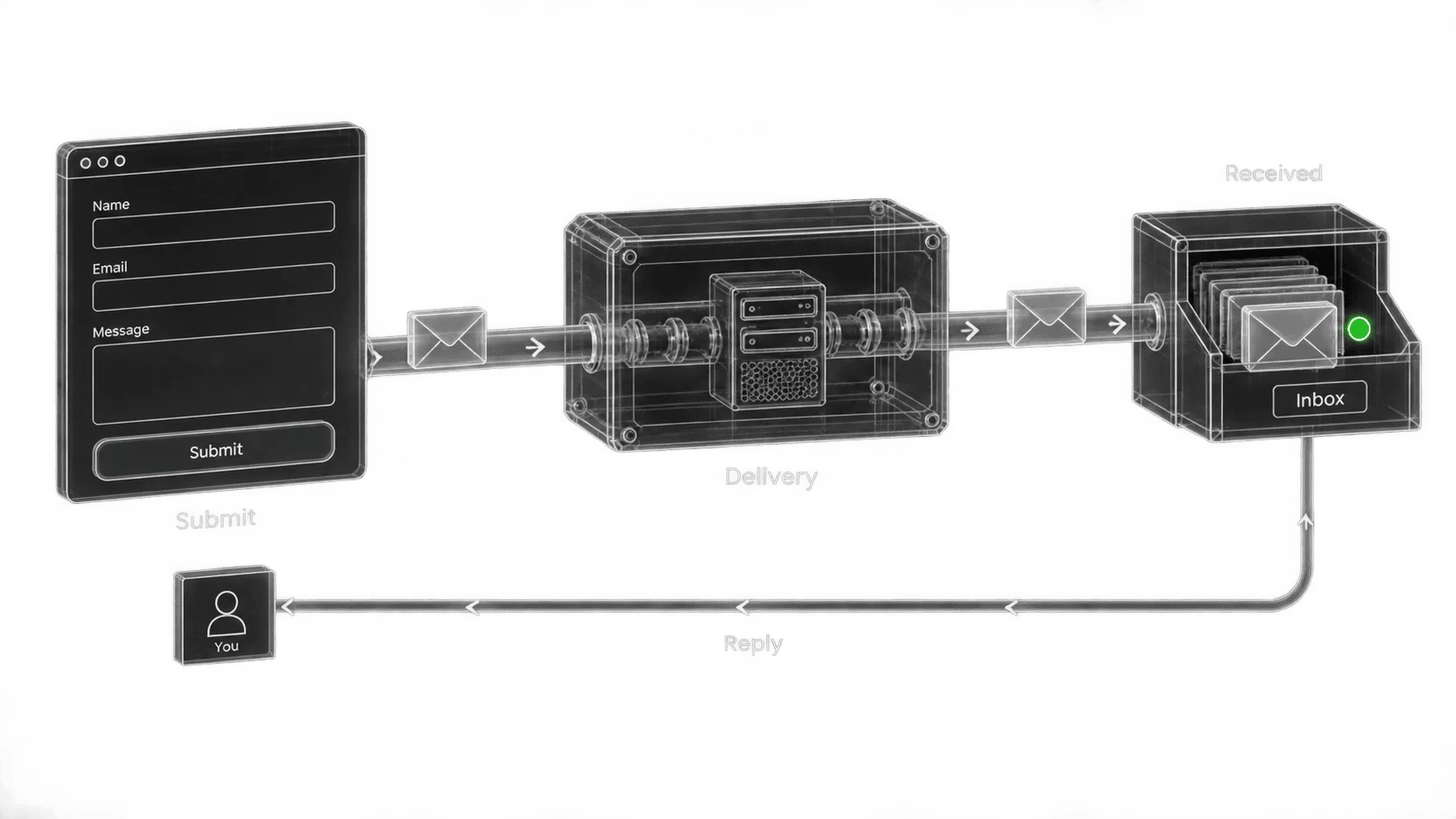
5. Submit every important form end to end
Test every distinct form and recipient route
Use identifiable test messages without sensitive data. Test each distinct form configuration and recipient route. A working contact form does not prove that a separate store or project brief reaches its destination.
Confirm delivery, reply handling, and submission records
Verify the complete sequence:
- Required fields and invalid input produce useful feedback.
- A valid submission completes once and shows a clear confirmation.
- The intended recipient receives the expected information.
- Replying reaches the test sender through the intended route.
- Any configured submission record is created in the expected location.
- Spam protection does not prevent an ordinary legitimate submission.
Pass condition: the business receives an actionable inquiry and the visitor receives an accurate result. If submissions are stored, verify access and the agreed retention behavior. Do not assume there is a recoverable record just because the form sends email.
6. Review search access and the intended public URLs
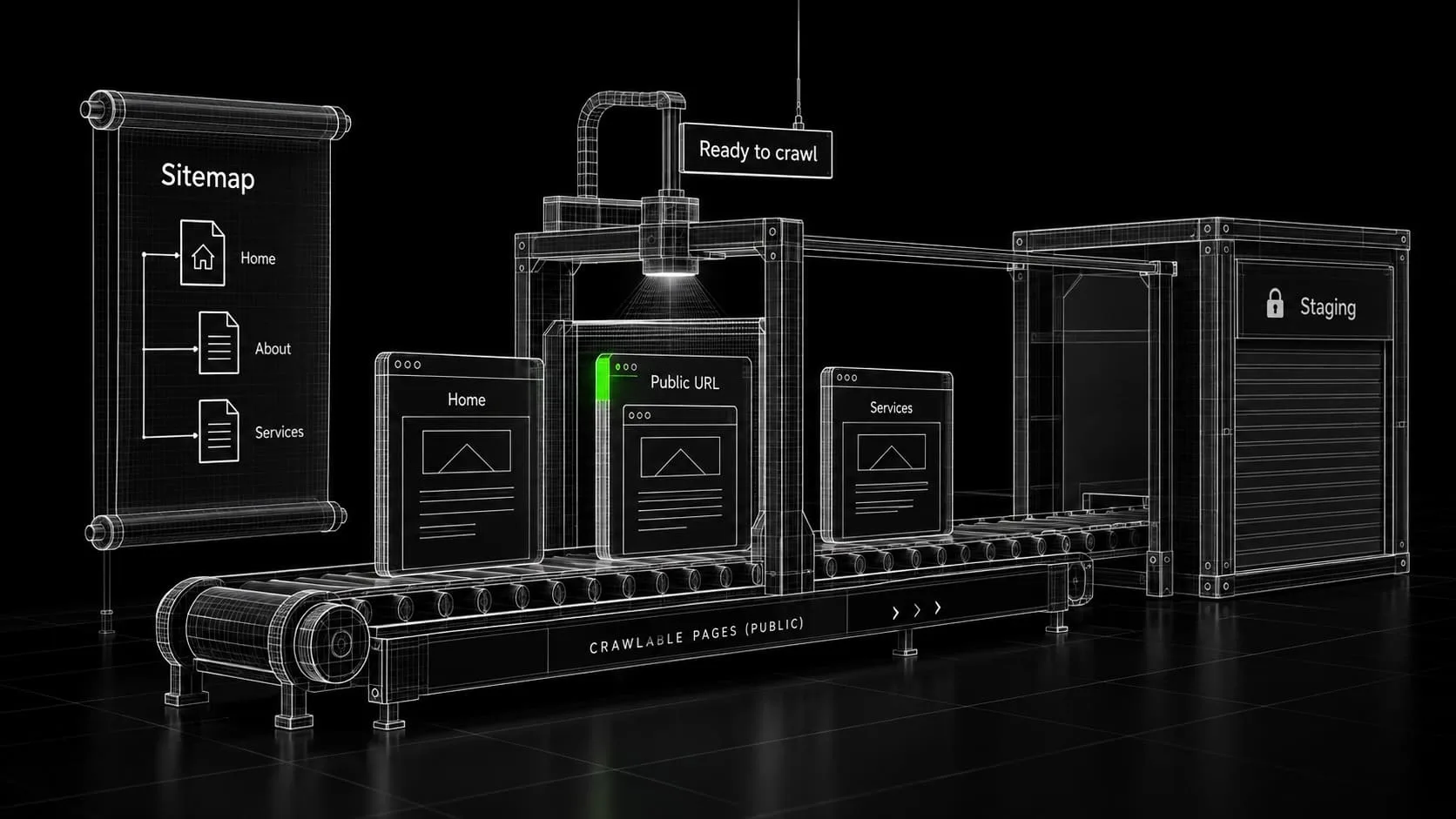
Separate public pages intended for search from private, utility, and staging content. Do not remove every restriction indiscriminately.
Inspect crawl restrictions and canonical destinations
- Inspect robots directives in the actual page or response, including settings that may have been inherited from staging.
- Review robots.txt for unintended blocking of public content or resources.
- Check canonical destinations on representative page types. They should not point to staging or unrelated pages.
Check page signals, sitemap URLs, and Search Console
- Review titles and headings for accidental defaults, missing subjects, or template errors.
- Check that the sitemap contains intended public canonical URLs and avoids known error or staging URLs.
- Confirm that the owner has access to the correct Search Console property and submit the sitemap where appropriate.
Do not confuse crawl controls with privacy or indexing
Robots.txt controls crawling; it is not reliable protection for private information or a universal way to remove URLs from search. Google can discover a blocked URL elsewhere. Use proper access controls for private content and the appropriate indexing directives for public pages that should not appear in search. Google’s robots.txt guidance
Pass condition: the intended public pages are technically available for search discovery, with no known release-blocking configuration conflict. Sitemap submission does not guarantee indexing. Google’s indexing FAQ
7. Verify measurement instead of stopping at tag installation
Trigger the agreed actions and inspect their events
Confirm the correct Analytics property and that the owner can access it. Then perform the important actions and inspect the resulting events using the appropriate diagnostic tools. Google Analytics DebugView can help verify collected events during testing. DebugView documentation
Check whether the same event is being sent through more than one implementation. A thank-you page reload or a button click should not automatically be treated as a new successful inquiry without considering the actual behavior.
Exclude personal data and test consent behavior
Review event names and parameters. Form contents, email addresses, and other personally identifiable information should not be sent to Google Analytics. Review URL parameters too, since personal information can enter collection through page addresses. Google Analytics PII guidance
Test the site’s configured consent states as applicable. Expect some measurement differences caused by consent and browser behavior; analytics totals are not a replacement for the business’s actual inquiry or order records.
Pass condition: the agreed actions produce intelligible, non-duplicated events in the tested conditions, with no personal form data included. For purchases, verify the store’s event implementation separately.

8. Check recovery and maintenance readiness
Check backup completeness and prove the recovery route
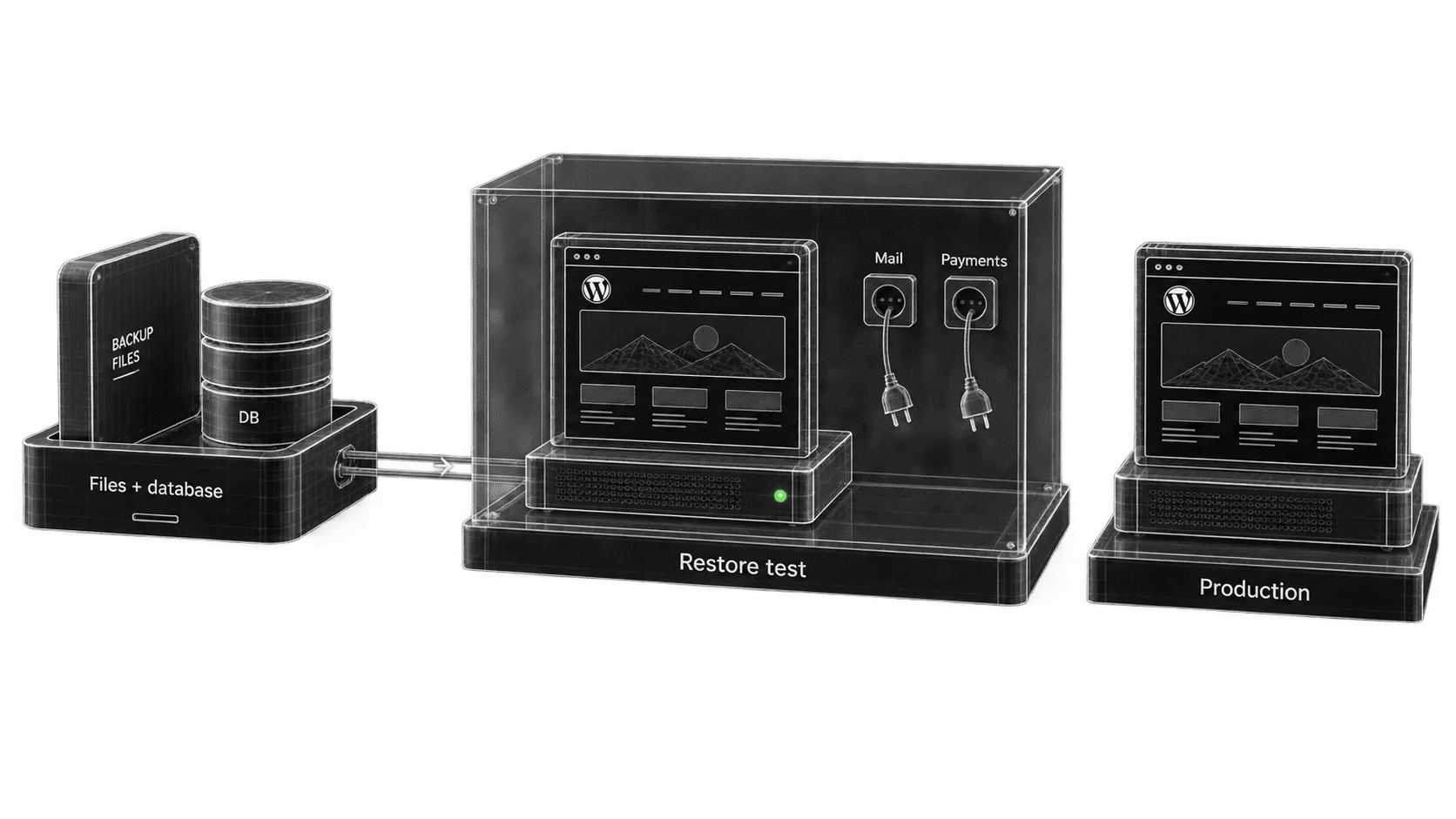
Confirm that the backup covers the database and relevant files, and that the owner or responsible maintainer can reach it. WordPress documents these as distinct parts of a complete site backup. WordPress backup guidance
Test restoration in a separate environment where feasible, with production email, payments, and scheduled actions disabled or safely isolated. A successful backup notification is not the same evidence as a successful recovery.
Assign maintenance and remove unnecessary components
Review installed extensions, their purpose, and the update responsibility. Remove unnecessary development access and unused components through the appropriate change process. Do not make a large untested software update immediately before announcing the launch.
Pass condition: the recovery route, account access, and maintenance responsibility are known. Any untested recovery assumption is documented rather than reported as verified.
9. Repeat critical checks on production
Retest the critical journeys on the live configuration
After the release, repeat the checks most likely to be affected by the environment change: public URLs, HTTPS, key templates, forms and mail, search directives, and measurement. For a store, repeat the agreed purchase verification using the live configuration.
Preserve the release evidence and outstanding actions
Record the release date, version or deployment reference where available, backup reference, test results, and outstanding actions. Preserve the previous configuration long enough to support the agreed recovery plan without leaving sensitive copies publicly accessible.
Pass condition: the production site, not only the staging copy, has passed the critical path review.
Assign post-launch observation explicitly
Assign the checks that continue after launch
Indexing, real-world performance, inquiries, and new errors become observable over time. Specify who will review them and what happens when an issue is found.
Make ongoing management or handover explicit
If the website remains under my management, it can be added to the monitoring and audit panel as part of that arrangement. If it is handed over without continued management, the owner or their chosen maintainer takes responsibility for observation. I do not assume ongoing access after handover.
The support and growth guide explains this continuing work. The ownership guide covers the account and documentation handover.
Frequently asked questions
Should we wait until every page is indexed before launching?
Indexing is not a prerequisite that a private staging site can reliably satisfy. Launch the complete, technically ready public site, then observe discovery and indexing under an assigned responsibility. Do not promise a date on which every URL will appear in Google.
Is a perfect speed-test score required?
A single score should not replace inspection of important pages and interactions. Investigate material loading or responsiveness problems, especially on mobile, and verify the essential journeys. Record the tested conditions instead of describing one laboratory result as permanent site-wide performance.
Do all pages need manual review?
Every planned page needs a content and completeness review. Shared technical behavior can be tested by template family, supported by a crawl or other checks, with manual attention to exceptions and important actions. Sampling one template does not prove that every page has correct content.
What if the form reports success but no message arrives?
Treat the inquiry path as failed. Inspect the configured recipient, submission record if available, sending service, authentication, and mailbox filtering. Repeat the test after the cause is addressed. The visitor-facing success message alone is insufficient evidence.
Is this the same as an ongoing SEO audit?
No. This is a release-readiness review for the agreed build. Ongoing technical SEO work examines the site as it develops and as search data becomes available. The launch record is a useful baseline for that work.
Who receives the completed checklist?
The owner should receive the release record together with the relevant handover information. It should identify what was tested, known limitations, and the person responsible for each follow-up, rather than implying that the site will never need attention again.
Have the build and launch handled together
When I create a new website, launch preparation connects the content and WordPress build with the domain, server, mail, analytics, and ownership setup. Share your project and its current stage so we can discuss the work as a complete delivery.


