

 WordPress & YOOtheme Pro
 WooCommerce Development
 Website Planning
 Website Ownership & Access
 Website Support & Growth
 Website Launch Checklist
How to Run a Technical SEO Audit That Leads to Useful Repairs
A technical SEO audit should help you decide what to change and why. A list of warnings does not do that on its own. It can contain genuine problems, intentional exclusions, duplicate reports of the same defect, and suggestions with little relevance to the website.
The useful output is a repair plan supported by evidence: which pages are affected, what is wrong, where the problem originates, and how someone will verify the correction. This guide explains how to produce that output for a WordPress website or WooCommerce store.
If you need an overview of the systems involved before starting, read the technical SEO guide. Here, the focus is the audit itself: collecting evidence, testing explanations, and converting findings into work.
Decide which question the audit needs to answer
Match the audit to launch, traffic loss, or redesign goals
A launch review, an investigation into lost traffic, and a pre-redesign assessment require different comparisons.
For a launch, compare the delivered website with the approved page inventory. For a traffic loss, establish when the change began and which pages or queries changed. Before a redesign, preserve the current URL structure, search-facing pages, and implementation details that the new site must account for.
Define scope, limitations, and the event under investigation
Write a one-paragraph scope before crawling. Include the domain, any relevant subdomains, important page families, the event under investigation, and access limitations. If the audit excludes a separate shop or documentation subdomain, say so. Otherwise, readers may assume a partial crawl represents the whole business.
For a traffic investigation, also check whether the apparent loss is specific to organic search. Missing analytics events can look like lost visits or inquiries. Google’s traffic-drop troubleshooting guide recommends examining affected periods and segments and considering causes beyond technical failures.
Assemble the evidence you actually need
Gather the content inventory, crawl, sitemap, and change history
Start with these inputs:
- The content plan or an inventory of pages the owner expects to be public.
- Search Console data for the correct property and relevant period, when available.
- A crawl of the public site, with the crawl settings and date recorded.
- The XML sitemap or sitemap index currently published by the site.
- A short change history: releases, plugin changes, URL moves, imports, and outages.
- Access to inspect the public output and, where agreed, the settings responsible for it.
Use appropriate access and label missing evidence
Use the minimum account access appropriate to the task. An initial public review does not require someone to send their hosting password. A deeper investigation may require read access to Search Console or selected server logs; request that through account permissions after the scope is agreed.
If Search Console is unavailable, label the missing evidence. You can assess public behavior, but you cannot report Google’s selected canonical or recorded indexing state as if you had inspected them.
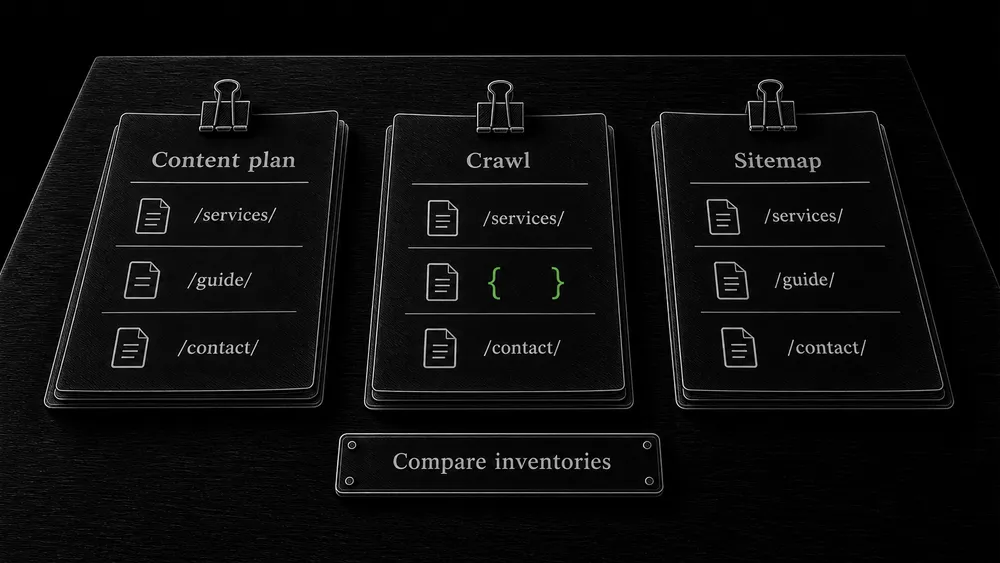
Reconcile inventories before interpreting crawl totals
Compare planned, crawled, and sitemap URL inventories
A crawler follows what it can discover. A sitemap lists what its generator includes. The content plan describes what should exist. Differences among these sets are often more useful than an overall score.
Compare them by exact URL, then by normalized URL where appropriate. Preserve the original values so normalization does not hide a hostname, protocol, or parameter problem.
An important planned page absent from both the crawl and sitemap may not have been published. A page in the sitemap but absent from a navigation crawl may be isolated. Thousands of URLs discovered only through filters may describe an uncontrolled URL family rather than thousands of useful landing pages.
Record crawl limits before interpreting missing URLs
Do not assume any single export is complete. Record crawler limits, excluded paths, JavaScript rendering settings, authentication, and whether the crawl stopped early. A crawl interrupted by an access challenge is an observation about access, not a reliable count of the website’s pages.
Select a sample that exposes shared problems
Sample page families and important exceptions
Inspecting every page manually is rarely the best first step. Select representative pages and known exceptions, then widen the review when you find a pattern.
| Page family | Include in the initial sample | What this can reveal |
|---|---|---|
| Service pages | A main service page and a deeper supporting page | Shared metadata, content fields, and inquiry paths |
| Guides | A recent article and an older article | Publication settings, templates, and editorial migrations |
| Categories | A populated category and a later pagination page | Navigation output and access to deeper content |
| Products | A simple product, a variable product, and an unavailable product | Availability states and product data differences |
| Special URLs | A redirect, an intentionally excluded URL, and a missing URL | Whether exceptional responses are intentional |
Check shared templates and preserve page-level evidence
Choose samples from different templates rather than several visually similar URLs built with the same template. If every inspected guide is missing its main body, investigate the shared guide layout before editing individual articles.
For each sample, retain the response status, indexing instructions, canonical, main content, relevant links, and the conditions of the test. On dynamic pages, retain a rendered view as well as the initial HTML where those differ.
Test hypotheses instead of assigning causes from warning labels
Compare a warning with the actual public page
Suppose a crawler reports that a page is missing a heading. Possible causes include an empty editor field, a template that does not render the field, a failed request, or a crawler configuration that did not see the completed page. The label alone does not distinguish them.
Open the affected page anonymously. Compare it with a working page of the same type. Inspect the response and rendered output. Then trace the difference to the editor, template, plugin, or delivery layer.
Test the suspected cause and its affected scope
Use this sequence for each substantial finding:
- Observation: capture the exact behavior without explaining it prematurely.
- Hypothesis: identify a plausible shared cause.
- Discriminating test: choose a check that would support or contradict that cause.
- Scope check: inspect additional affected and unaffected pages.
- Repair proposal: describe the smallest appropriate change and its risks.
An example of a discriminating test is comparing the uncached origin response with the public cached response through authorized infrastructure access. If only one contains an old exclusion directive, the next investigation differs from a case where both contain it. The audit should identify the layer responsible, not merely recommend “clear the cache.”
Separate four kinds of findings
Distinguish confirmed defects from intentional behavior
Confirmed defects have reproducible evidence and conflict with the intended page behavior. An important published guide whose template omits its body belongs here.
Intentional behavior matches an agreed decision. Keep the reason visible in the audit so it does not become the same warning at every review.
Separate optional improvements from unresolved questions
Improvements may make the system clearer or easier to maintain without correcting a demonstrated failure. Do not describe all of them as urgent SEO errors.
Unresolved questions lack enough evidence. Assign a next test or a request for information. Guessing a cause to make the report look complete makes subsequent work less reliable.
This classification helps a business owner understand the difference between required repair work and optional refinement. It also gives the developer permission to challenge a hypothesis with better evidence.

Review indexing, performance, and enhancements with the right tools
Match Google reports and crawl evidence to the question
Use Search Console to investigate Google’s reports, a crawler to compare site output at scale, and browser tools to examine requests and interaction behavior. They answer related but different questions.
The Page indexing report groups indexed and non-indexed URLs. Compare those groups with your intended page inventory instead of trying to make every URL indexed.
For a sitewide access problem, the Crawl Stats report can provide Google’s recorded response and host-availability evidence. Its example URLs are samples, not a complete request log; smaller uncomplicated websites usually do not need ongoing crawl-budget analysis.
Test performance and structured data against actual page behavior
Use the Core Web Vitals workflow to investigate real performance problems. A homepage Lighthouse run is not a performance audit of the whole website.
Where a page uses structured data, test the relevant output with Google’s tools and check it against the visible page. A syntactically valid declaration can still describe something the page does not contain. Google’s structured data policies require relevant, truthful markup and do not guarantee a rich result.
Write an issue a developer can act on
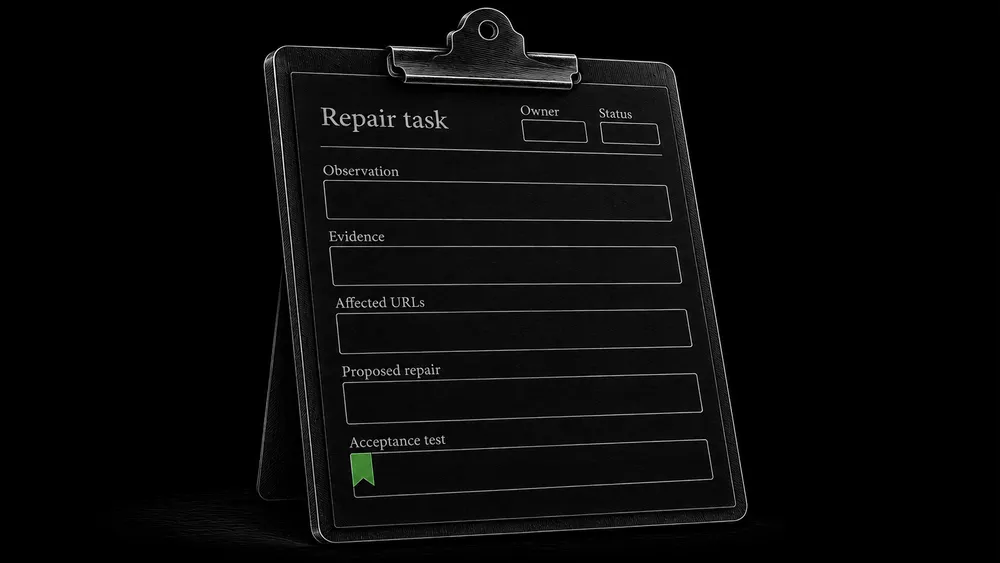
The following is an illustrative issue format, not a claim about a client project.
| Field | Example audit entry |
|---|---|
| Observation | The main article body is absent on published guides using one layout |
| Evidence | Saved anonymous response and screenshot; editor contains the missing body |
| Affected scope | All URLs using the guide layout; list attached to the issue |
| Likely cause | The layout’s content element no longer references the article body |
| Proposed repair | Restore the intended field connection in the shared layout |
| Dependency | Confirm which body field is authoritative before editing |
| Acceptance test | Existing and newly created guides display the correct body on mobile and desktop |
| Regression test | A service page using another layout remains unchanged; guide links and forms work |
| Follow-up | Inspect selected repaired URLs after Google next processes them |
A useful issue also includes an owner and status. Keep “implemented,” “verified live,” and “observed by Google” separate. The developer can complete a repair before Google has revisited the pages.
Prioritize without inventing a universal score
Prioritize by consequence, scope, confidence, and risk
Assess the importance of the affected pages, the number of pages sharing the cause, confidence in the diagnosis, and the consequence of delay. Include implementation dependencies and the risk of the proposed change.
A sitewide rule affecting all commercial pages may deserve immediate attention. A broad redirect rule proposed to fix a few old links may deserve extra testing because it could affect unrelated URLs. A cosmetic metadata consistency issue can wait when the primary page content is missing.
Group shared causes without inventing financial impact
Do not turn the number of crawler warnings into a projected revenue loss. An audit can demonstrate an obstacle and its scope; it usually cannot isolate the revenue that would have occurred without it.
Group repeated symptoms under the underlying issue. If one template causes 300 affected pages, the developer needs one well-scoped template task and a URL list, not 300 separate tickets repeating the same recommendation.
Close the audit with evidence, not a second score
Retest affected pages and preserve before-and-after evidence
Retest the original failures using comparable conditions. Keep the old and new output, the deployment date, and any exceptions. Re-crawl the affected section after shared changes; do not rely only on the one page used during development.
For indexing-related findings, continue with crawling and indexing diagnostics. For URL changes, use the redirect verification sequence. If a defect can recur after updates, add it to the change-monitoring plan.
Hand over a decision summary and an actionable issue register
The handover should contain a short decision summary, an issue register, supporting evidence, and unresolved questions. The owner should be able to understand what was repaired and pass the remaining work to another developer without reconstructing the entire investigation.
Frequently asked questions
Is an automated audit enough?
It is useful for discovering patterns and collecting repeatable observations. It cannot decide the intended role of every page or validate every proposed fix. Review the important findings against the content plan, public output, and business priorities.
How many checks should a technical SEO audit include?
Enough to assess the systems and page families within the agreed scope. A fixed count can encourage irrelevant checks or split one issue into several headings. Judge the audit by the evidence and decisions it produces.
Do I need a complete audit for one broken page?
Start with the page and a comparison page using the same template. Expand the scope if the evidence points to a shared cause. A focused investigation may resolve a specific problem more efficiently than a broad audit.
Can a clean audit explain why my pages do not rank?
A clean technical review means no material issue was found within its scope and methods. It does not establish that the content is the strongest answer for its target searches. Query relevance, content quality, competition, and other factors still require assessment.
Should I change everything the report recommends at once?
Usually, group changes by cause and dependency, then verify each group. A large undifferentiated release makes it harder to identify what improved the behavior or caused a new problem. Some related configuration changes do need coordinated deployment.
What should I send before requesting an audit?
Send the domain, the reason for the review, a few important or affected URLs, and recent changes you know about. You can describe the symptom in ordinary language. Account permissions and additional evidence can be arranged after the scope is clear.
Turn an unclear problem into a defined repair plan
If you have a WordPress website with an unexplained technical issue, share the symptom and what you have already checked. I can review the situation and define an appropriate investigation. For a new website, the same audit principles can be applied to launch readiness.