

 WordPress & YOOtheme Pro
 WooCommerce Development
 Website Planning
 Website Ownership & Access
 Website Support & Growth
 Website Launch Checklist
AI Crawler Access: Let Search Services Reach the Right Content
A public page in your browser may not be accessible in the same way to a search crawler. The request may encounter an indexing directive, a robots rule, a security challenge, or a response that does not contain the intended article.
The task is to make the public content available to the services you choose, while preserving deliberate restrictions. It is not to remove every protection from the website.
Begin with a policy decision: which uses do you want to permit, and which pages are intended for public discovery? Then inspect the live configuration and verify the result. This is the access layer of AI Search Optimization.
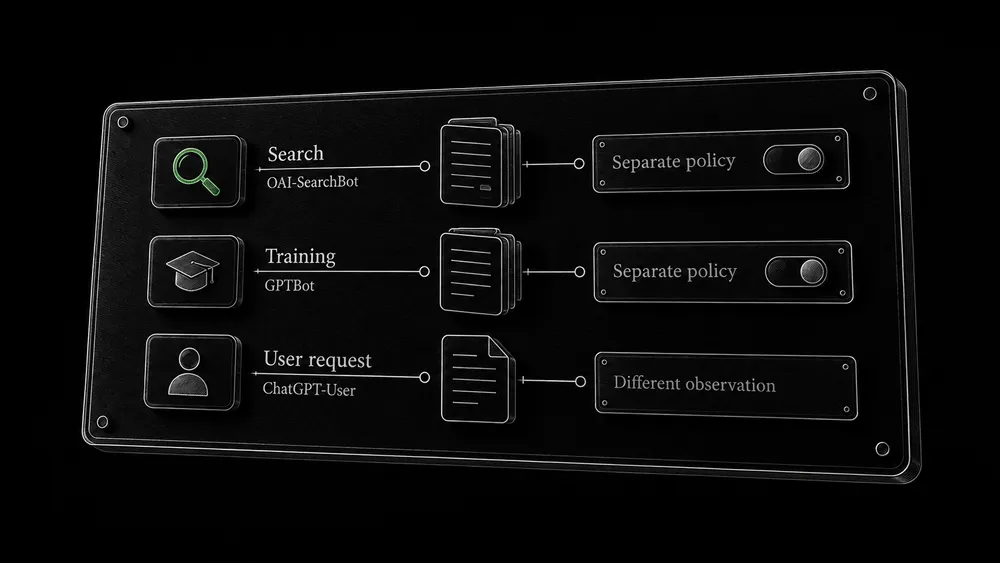
Separate search, training, and user-requested visits
Distinguish OpenAI search, training, and user-initiated requests
“AI bot” is too broad a category for an informed decision. OpenAI distinguishes OAI-SearchBot for search from GPTBot for potential model-training use. Those preferences can be set independently. ChatGPT-User handles user-initiated activity and is not the control for Search inclusion. OpenAI also publishes crawler IP information. OpenAI crawler documentation.
Identify Google search controls and provider-specific policies
For Google Search AI features, Googlebot is the relevant search crawler. Google-Extended does not determine inclusion or ranking in Google Search. Google’s crawler descriptions.
| Intended outcome | Decision to make |
|---|---|
| Public guides can be discovered through search | Permit the relevant search access and review indexing controls |
| The owner wants a different policy for training | Configure that preference separately using the provider’s current documentation |
| Someone asks an assistant to read a page | Treat the request as a distinct access observation, not proof of search discovery |
| Private client or administrative content must stay private | Use appropriate authentication and access controls |
Other providers may use different agents and policies. Review their documentation when they are in scope. Do not assume one setting controls every AI service.
List the pages and responses that matter
Select public page types and deliberate restrictions
Choose a small set representing the website: a hub, a detailed guide, a page with interactive or expandable content, and a store page if applicable. Also identify private and utility routes that should remain restricted.
For this site’s content system, a sensible public sample includes the development hub, ownership guide, and launch checklist. The purpose is to verify different reading and template conditions, not to claim those production checks have already passed.
Record canonical test URLs, methods, and evidence limits
Record the exact preferred URLs. Include the final hostname and HTTPS version. Testing a staging domain or an alternate URL does not automatically establish the behavior of the intended public page.
Keep a simple test record:
URL and page type:
Intended audience and permitted use:
Test date and method:
Response and final destination:
Main content present:
Relevant directives:
Security rule or event, if any:
Observed result and limits:
Next action and owner:
The method field matters. A normal browser visit, a command-line request, and a verified crawler observation are different evidence.
Check what an ordinary public request receives
Check the anonymous response and main content
Open the page without an authenticated editing session. Confirm that the main text, meaningful links, and relevant media context are available. Follow redirects and inspect the actual destination.
Do not stop at the status code. A response can report success while displaying a challenge, an empty shell, or an error message. Check the body content as well as the response.
Compare initial HTML, rendering, and interactive content
A developer can compare the initial HTML with the rendered page and investigate content that appears only after an interaction. The practical aim is to avoid making essential explanations depend on behavior the intended service may not perform. Do not assume all crawlers execute JavaScript or interact with page components identically.
This is also a good time to find staging references, unavailable downloads, and links that work only for logged-in users. Use the launch checklist for the broader release review.
Review indexing directives separately from robots.txt
A robots rule and an indexing instruction perform different jobs. Review both instead of assuming that “allowed” in one file establishes the whole state.
Inspect the actual page and response for relevant directives. Configuration may come from WordPress, a plugin, the server, or another delivery layer. A setting visible in an administration screen is only part of the evidence; confirm what production sends.
Do not use robots.txt as protection for confidential material. The robots and sitemap guide explains the underlying distinctions and the appropriate role of these files.
For Google AI eligibility, the Google-specific guide explains why crawl access alone is insufficient. For other services, check their current rules rather than copying Google’s interpretation indiscriminately.
Inspect the public robots.txt, including managed additions
Inspect the actual robots.txt and applicable agent groups
Read the file served from the public hostname. Compare it with what you intended to publish. Check applicable agent groups and any broad rules that may be inherited from development.
Do not paste a generic “allow AI” file over an existing configuration. More specific groups can interact with your intended restrictions, and deleting existing directives can expose routes you meant to keep out of crawling. Preserve a copy and understand the changes before deploying them.
Check managed additions and the public result after changes
Cloudflare can manage additions to robots.txt, so the public response may contain more than the file or settings you edited in WordPress. Its documentation explains the managed robots.txt behavior.
After any change, inspect the public response again. Purging or updating the relevant cached representation may be necessary depending on the setup. The verification target is the actual file being served, not simply a saved configuration screen.
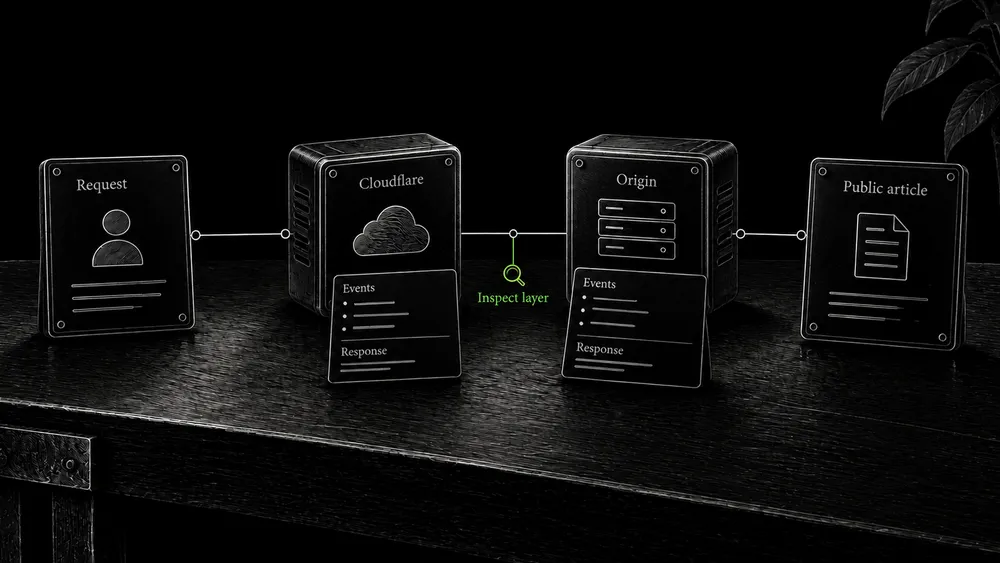
Check Cloudflare and the origin as separate layers
Locate the controlling security layer
Permission in robots.txt does not override a security block. Cloudflare’s AI Crawl Control can enforce crawler restrictions through WAF rules. Cloudflare explains how crawler management works.
Review applicable bot controls, custom rules, and security events for the requested URL. Identify which component made the decision. If the request never reached the origin, changing a WordPress plugin may not solve it. If Cloudflare passed the request but the server denied it, investigate the origin instead.
Apply a narrow correction using available account controls
The appropriate fix should be narrow: correct an unintended rule for the intended public traffic while retaining the protection the site needs. Avoid a blanket instruction to disable the WAF or allow every request containing a familiar user-agent string.
Available controls and interface labels can change by plan and product version. Verify the options on the actual account. This guide does not assume a paid feature is present in a Cloudflare Free setup.
The Cloudflare guide covers the wider website configuration. Here, keep the investigation focused on the access path relevant to search discovery.
Verify bot identity before treating a log entry as proof
Distinguish a simulated request from verified crawler identity
A user-agent string is a request label, not independent authentication. A manual request using a crawler’s name can test how your site responds to that string. It does not prove how a genuine provider request will be classified by all security layers.
Use the provider’s published verification method or network information where applicable. Preserve the distinction between an actual verified crawler observation and a simulation you performed for debugging.
Record access evidence without claiming indexing or citation
A useful log record identifies the requested path, time, response, and relevant security decision. Do not collect or publish sensitive request data merely to demonstrate that monitoring exists.
Even a verified successful crawler request proves access at that time. It does not establish indexing, citation, or recommendation. Keep that boundary in the report.

Retest after a targeted change
Repeat the affected checks on the public URL. Confirm the main content, response, relevant directives, and intended private restrictions. If a shared rule changed, test representative affected page types as well.
Record what changed and why. “Removed an unintended challenge from the public guide route for verified search traffic” is an actionable release note. “Enabled AI” conceals too many assumptions.
If a test remains inconclusive, document the gap. You may be able to confirm the configuration and a normal public fetch while waiting for a genuine crawler visit. That is a valid intermediate state, not a reason to invent a successful observation.
Maintain access as part of the website
Revisit the relevant checks after changes to security policies, hosting, templates, or indexing settings. A working launch configuration can change later.
Assign responsibility if ongoing monitoring is included. If the client takes over the website, hand over the policy decisions and test records along with the accounts. Continued access should remain tied to an agreed service.
The AI visibility guide explains the next layer: observing discovery and response after technical access has been assessed.
Frequently asked questions
Must I allow training to appear in ChatGPT Search?
OpenAI documents separate preferences for search and training, as described above. Decide on each purpose deliberately. Do not assume that permitting one requires permitting every other use.
Does a successful browser visit prove crawler access?
No. Requests can be treated differently by security layers, and a logged-in browser can see content unavailable publicly. Inspect the relevant evidence and identify the limits of the test.
Should I turn off Cloudflare to make the site accessible?
Start by identifying the actual blocking rule or response. A targeted correction is preferable to removing protection without understanding the cause. The origin may also contribute to the problem.
Is a fake crawler user agent a complete test?
No. It can reveal string-based behavior, but it does not reproduce verified provider identity or every network condition. Label such a test accurately and use stronger evidence where available.
Can robots.txt keep client documents private?
It is not a substitute for access control. Private material needs appropriate protection independent of whether a crawler follows a preference. Keep private routes outside the public content project.
Does allowing a crawler guarantee that the page will be cited?
No. Access is one condition you can work on. Selection and presentation are separate decisions made by the service. Record successful access without overstating what it proves.
Review the access path for your public content
Share the site, the services you want it discoverable through, and any known blocking behavior. Configuration review can then focus on the intended public pages and the layer actually affecting them.